Introduction
1. Use Case & Solution Overview
In the era of digital transformation, manually entering data from invoices and receipts remains a significant bottleneck (pain point) for finance and SME operation teams. Manual transcription from scanned images or PDF files into spreadsheets or ERP systems is time-consuming, error-prone (resulting in typos in vendor names, invoice dates, amounts, taxes, or currencies), and carries security risks such as the exposure of sensitive financial data or external API keys.
DocuFlow AI is designed to fully automate this workflow by combining flexible AWS Serverless architectures, OCR capabilities (Amazon Textract), and external AI models (External AI Normalization) for structured analysis and classification. The system enforces strict security baselines using Amazon Cognito, IAM least privilege, AWS Secrets Manager, and S3 Block Public Access.
2. Approved Architecture Diagram
The approved architecture consists of several core blocks: Edge/Frontend, Authentication & API, Document Ingestion, AI Processing Pipeline, Data Persistence, Observability, Alerting, and Cross-cutting Security & Governance.
Figure 1 - DocuFlow AI architecture and processing flow
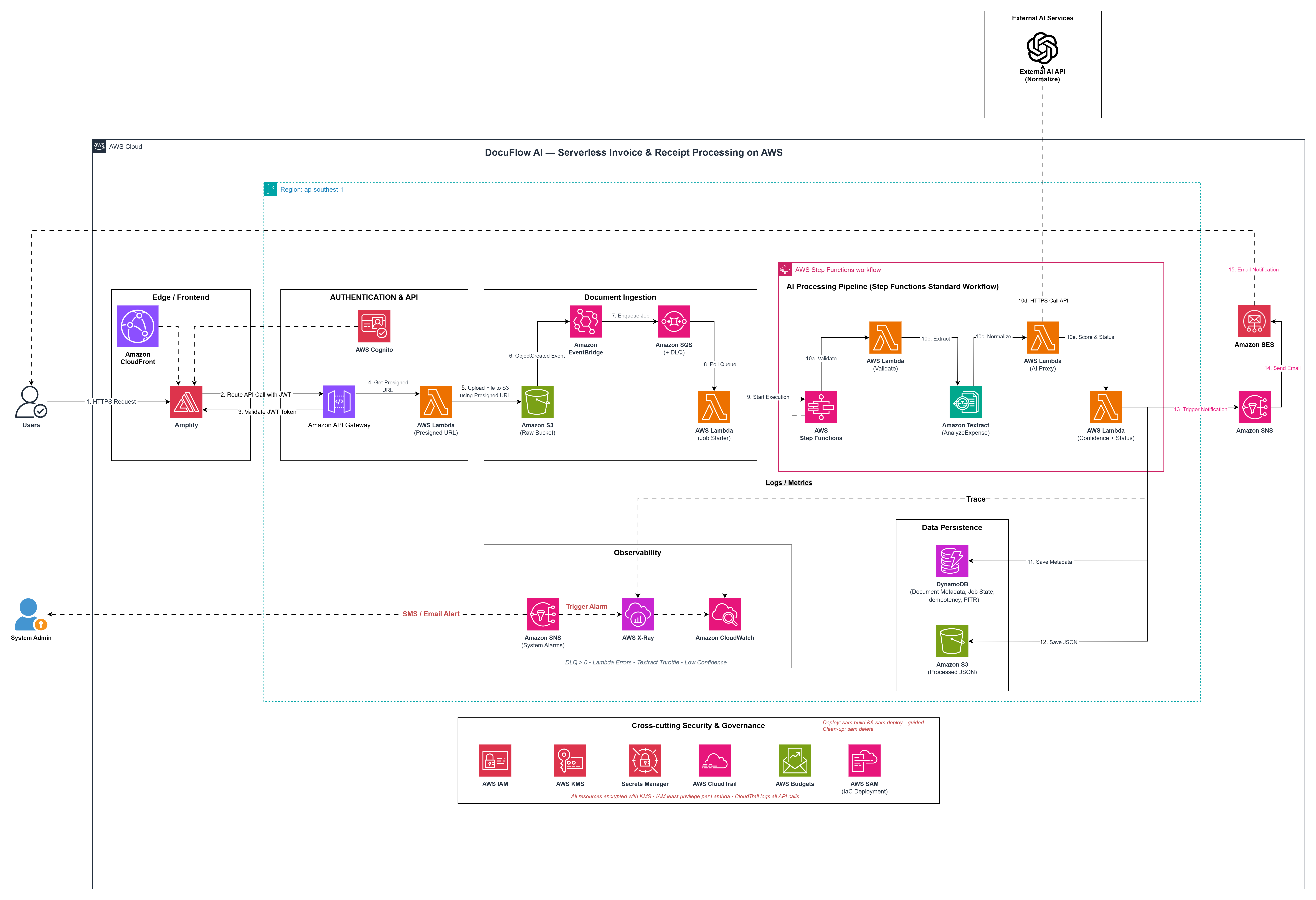
Figure 2 - DocuFlow AI architecture and processing flow
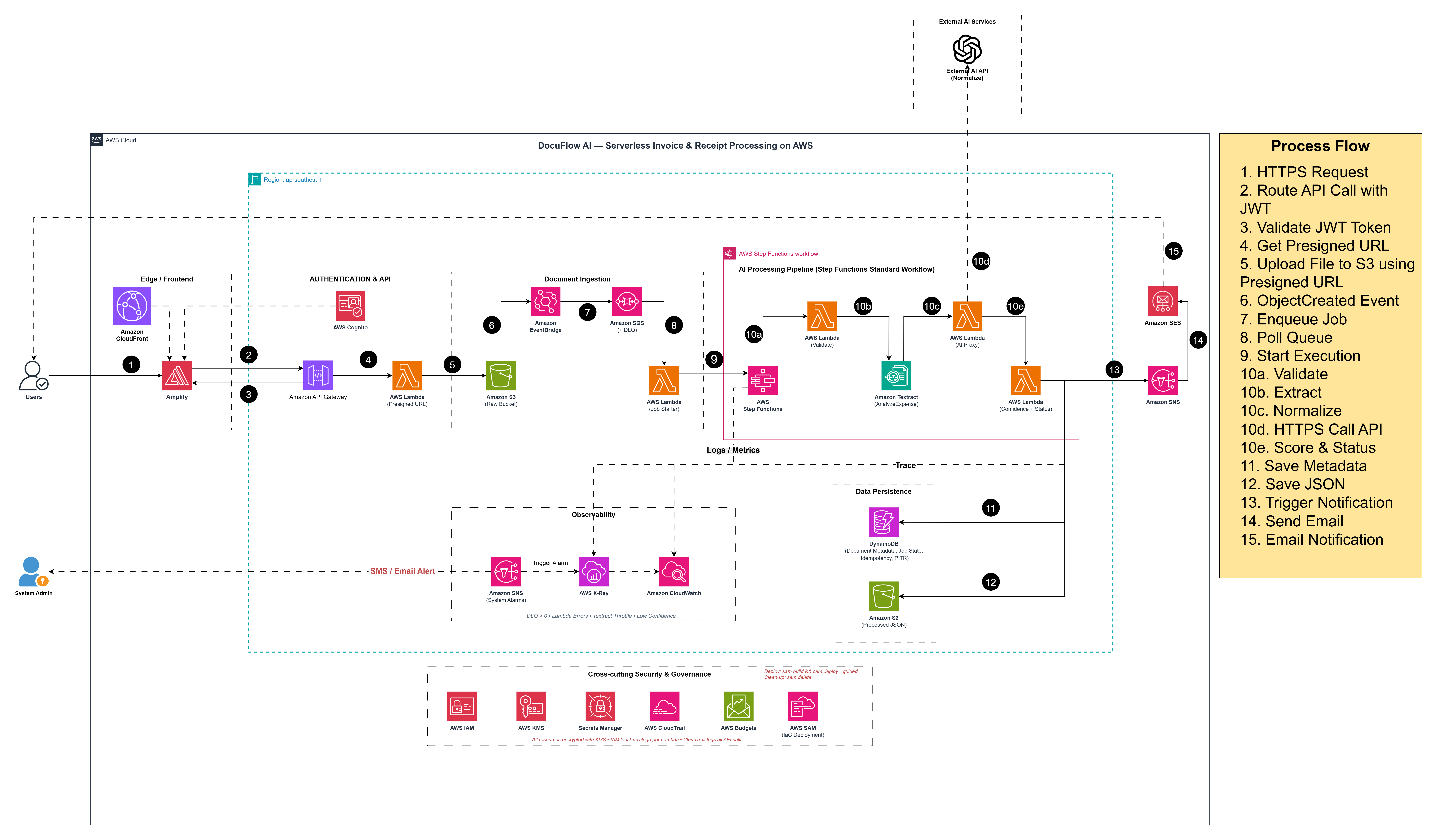
The high-level processing path is:
Frontend -> Cognito / API Gateway -> S3 Raw
         -> EventBridge -> SQS -> Job Starter Lambda
         -> Step Functions -> Validate -> Textract -> AI Proxy -> Confidence
         -> DynamoDB metadata + S3 Processed results -> Review APIs
3. Main Workflow & Asynchronous Processing Design
A crucial takeaway of this architecture is that the system does not process documents synchronously from the Frontend directly to the AI.
- Why was an asynchronous pipeline chosen? If processing were synchronous, users would be forced to wait on the UI while the system extracts text (OCR) and calls external AI models, often leading to HTTP connection timeouts or frozen web pages. Decoupling the upload flow from the processing pipeline using message queues ensures durability, acts as a workload buffer (SQS), enables automatic retries (retry policy), keeps an execution history for auditing, and safely isolates failed records (DLQ).
The end-to-end main workflow runs through 15 detailed steps:
- User access: The user opens the frontend web app distributed via CloudFront/Amplify.
- Authentication: The user logs in via Amazon Cognito and receives a secure JWT/token.
- Request upload URL: The frontend calls the API Gateway endpoint
POST /documents/upload-urlwith the file name and content type. - Generate presigned URL: A Lambda function generates a temporary S3 Presigned URL (valid for 300 seconds) and creates an initial metadata record in DynamoDB with a unique
documentId. - Upload file: The frontend uploads the raw document (
original.pdf/image) directly to the S3 Raw Bucket via the Presigned URL, bypassing any backend servers. - Create event: The S3 Raw Bucket fires an
ObjectCreatedevent, routed through Amazon EventBridge. - Queue job: EventBridge routes the job message to the Amazon SQS queue (
docuflow-dev-processing-queue). Persistent failures are automatically directed to a Dead Letter Queue (DLQ). - Start workflow: The Job Starter Lambda polls the SQS queue and triggers the AWS Step Functions Standard Workflow (State Machine) execution.
- Validate: The first state machine task runs a Validate Lambda to verify the file extension, size, and sets the document status to
PROCESSING. - Extract: The workflow invokes Amazon Textract (
AnalyzeExpenseAPI) to perform raw OCR on the invoice/receipt. - Normalize: The AI Proxy Lambda reads the External AI API key from AWS Secrets Manager (keeping it hidden from the frontend) and initiates a secure HTTPS post request to the External AI API to normalize, structure, and format the output into clean JSON.
- Confidence/status logic: The Confidence + Status Lambda calculates a combined confidence score. It updates the document status to
EXTRACTED(if >= 85%) orREVIEW_REQUIRED(if < 85% or if critical fields like total, date, or vendor are missing). - Persist: Amazon DynamoDB stores the final metadata/status (handling duplicate requests via Idempotency keys), and the S3 Processed Bucket saves the structured JSON result at
processed/{userId}/{documentId}/result.json. - Observe: Structured JSON logs are recorded in Amazon CloudWatch Logs, failures trigger CloudWatch Alarms, and requests are traced end-to-end via AWS X-Ray.
- Alert: Amazon SNS/SES sends email alerts when system failures occur or when a document requires manual review (
REVIEW_REQUIRED).
4. In-Scope Services (MVP Scope)
The primary AWS services implemented in this workshop include:
- Edge & Frontend: AWS CloudFront, AWS Amplify.
- Authentication & API: Amazon Cognito, Amazon API Gateway, AWS Lambda (Presigned URL generator).
- Storage: Amazon S3 (Raw & Processed).
- Event & Queue: Amazon EventBridge, Amazon SQS + DLQ.
- Workflow & Validation: AWS Step Functions (Standard Workflow), AWS Lambda (Job Starter, Validate, AI Proxy, Confidence/Status).
- AI & Extraction: Amazon Textract, External AI API.
- Database & Secrets: Amazon DynamoDB, AWS Secrets Manager.
- Observability & Management: Amazon CloudWatch (Logs/Metrics/Alarms), AWS X-Ray, Amazon SNS, Amazon SES.
- Security & Governance: AWS IAM, AWS KMS, AWS CloudTrail, AWS Budgets, AWS SAM.
5. Expected Outcomes at the End of the Workshop
Upon completing this workshop series, you will have successfully built:
- Fully Functional Frontend: A web interface for login, viewing a list/detail of extraction results, and editing fields using a Reviewer Form.
- Secure Authentication: User sessions managed via Cognito JWT tokens.
- Secure Uploads: Client-side direct uploads to S3 using Presigned URLs.
- Ingestion Pipeline: Automated event-driven message routing via EventBridge and SQS queues.
- Step Functions Workflow: Robust error-handling state machine with retry mechanisms.
- Standardized Storage: Persistent metadata in DynamoDB and structured JSON result outputs in S3.
- Observability & Alerts: Structured logs, X-Ray tracing map, alarms, and automatic email notifications.
- Resource Clean Up: Complete stack deletion using SAM CLI or cleanup scripts to control costs.