Setup and Run Frontend
1. Goal
Download the Frontend source code (React/Vite), configure the environment variables to connect with AWS resources created in step 3, start the local development server, and verify user signup/login using Amazon Cognito, along with raw document uploads using S3 Presigned URLs.
2. Steps
This section first prepares the frontend for local development. After the backend API is available, continue with 5.4.1 Deploy Frontend with AWS Amplify Hosting to publish the production frontend URL.
Step 1: Initialize Amazon Cognito User Pool
To secure user access using standard JWT tokens before uploading files:
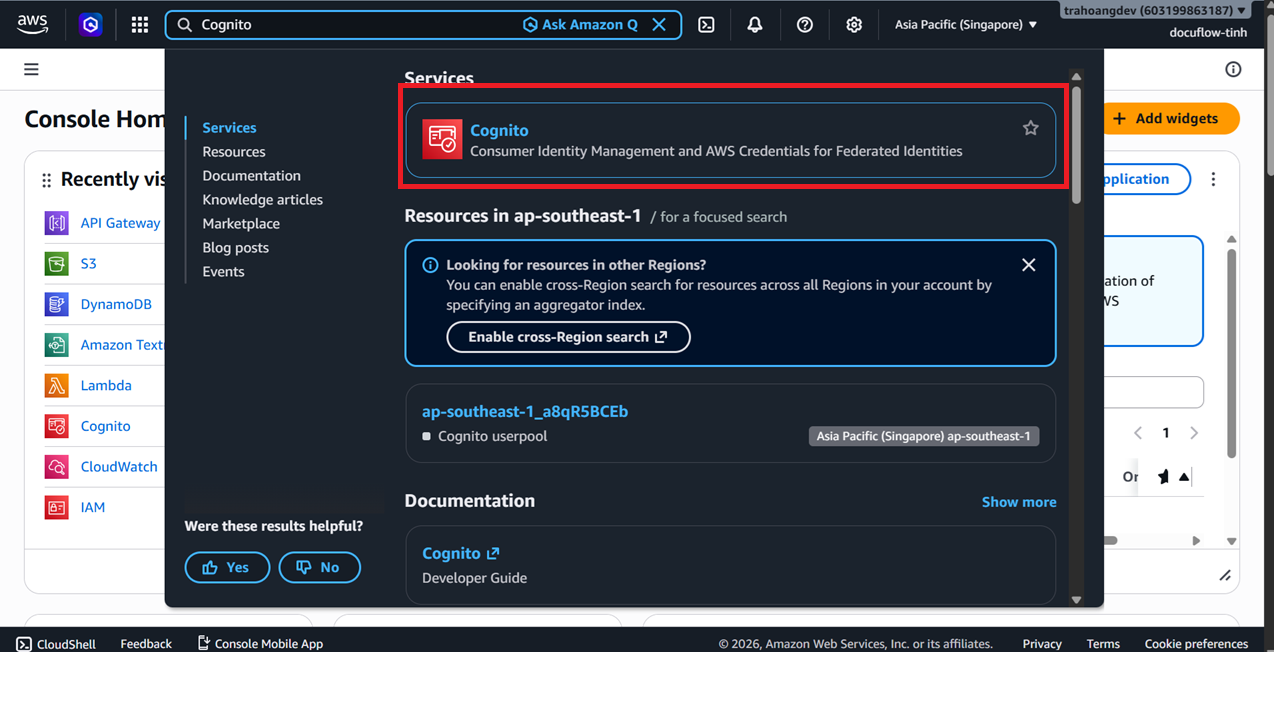
Search for Cognito in the AWS Console search bar.
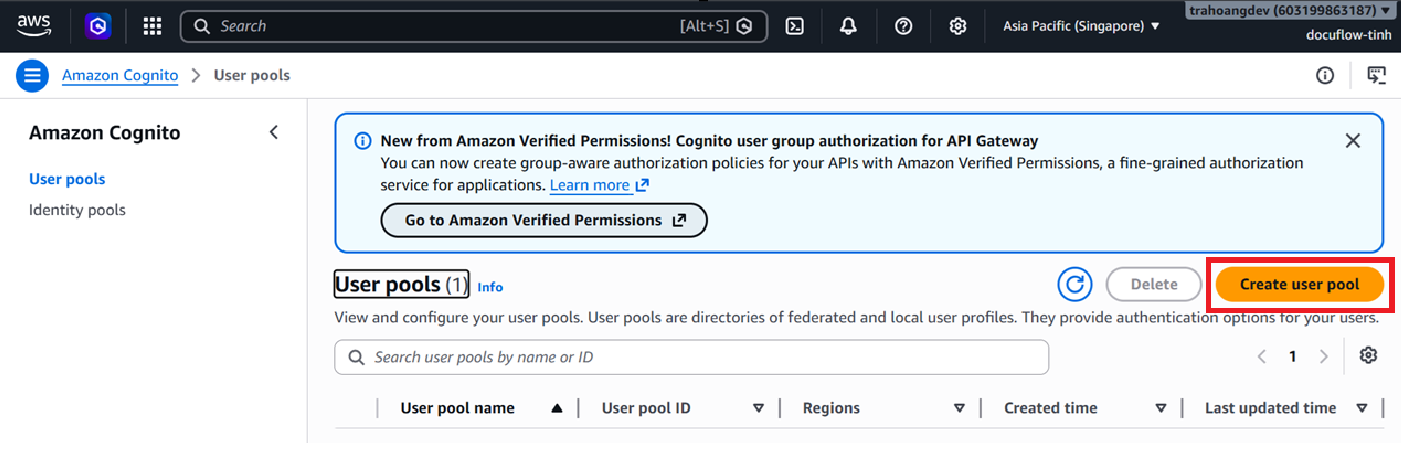
In the User pools interface, click Create user pool.
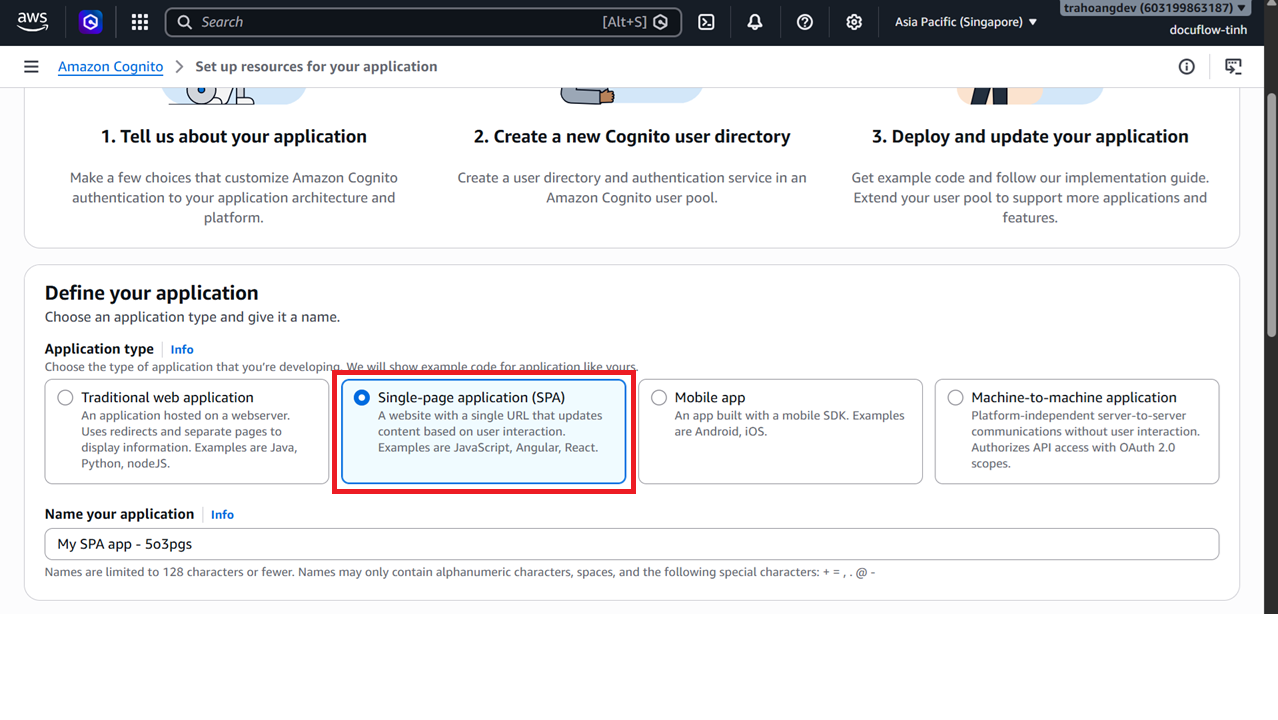
Under Application type, select Single-page application (SPA).
Enter
docuflow-dev-auth-user-poolas the application name.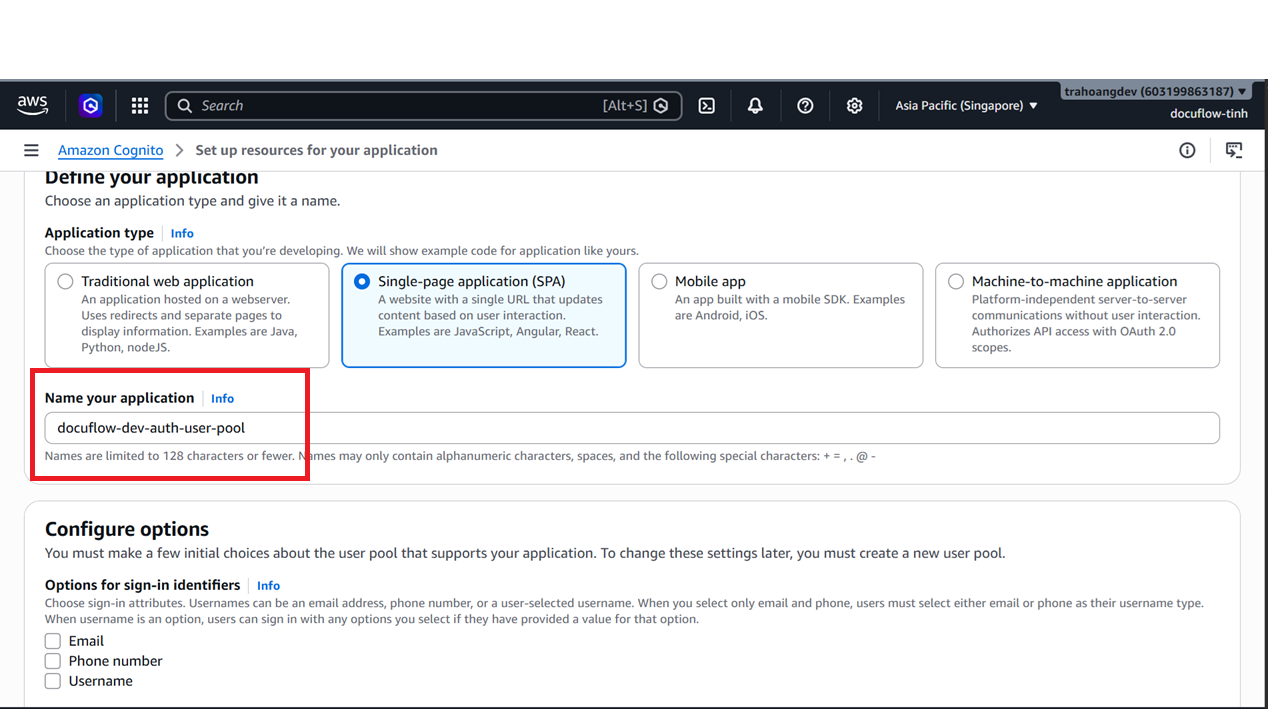
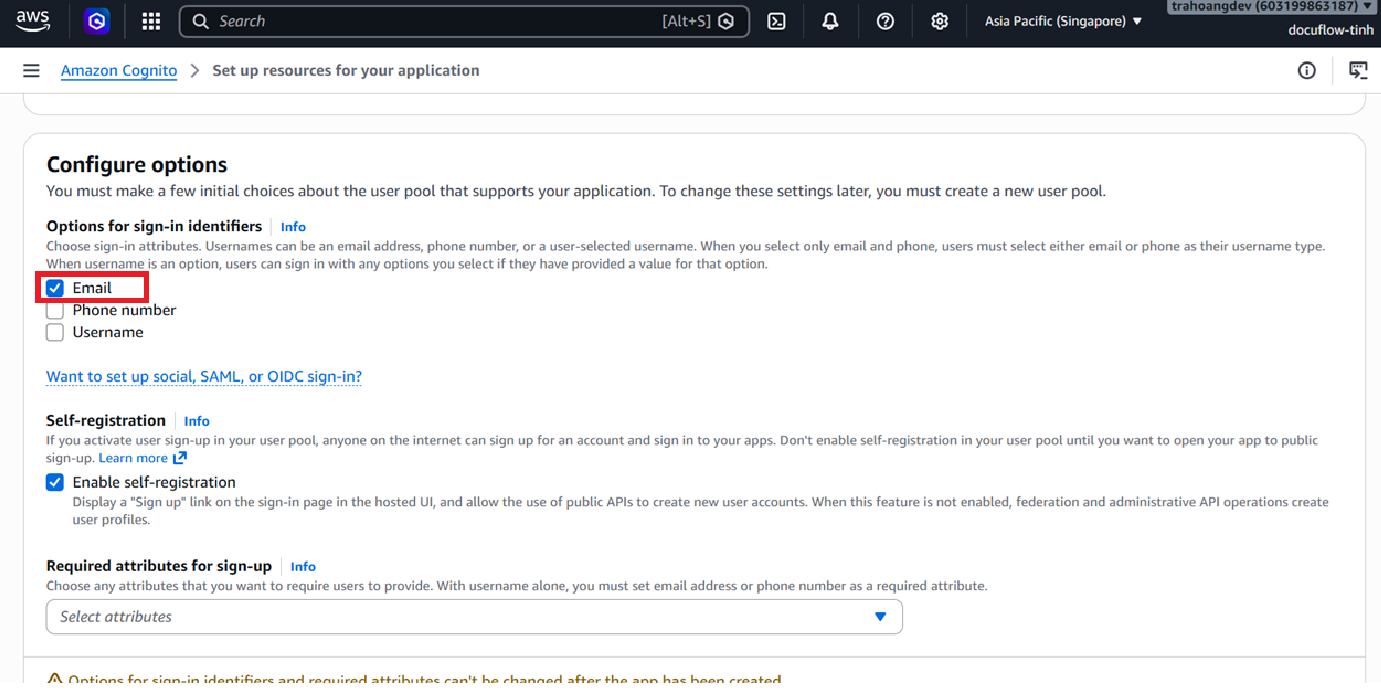
For Options for sign-in identifier, check Email.
For Required attributes for sign-up, select
email,family_name, andgiven_name.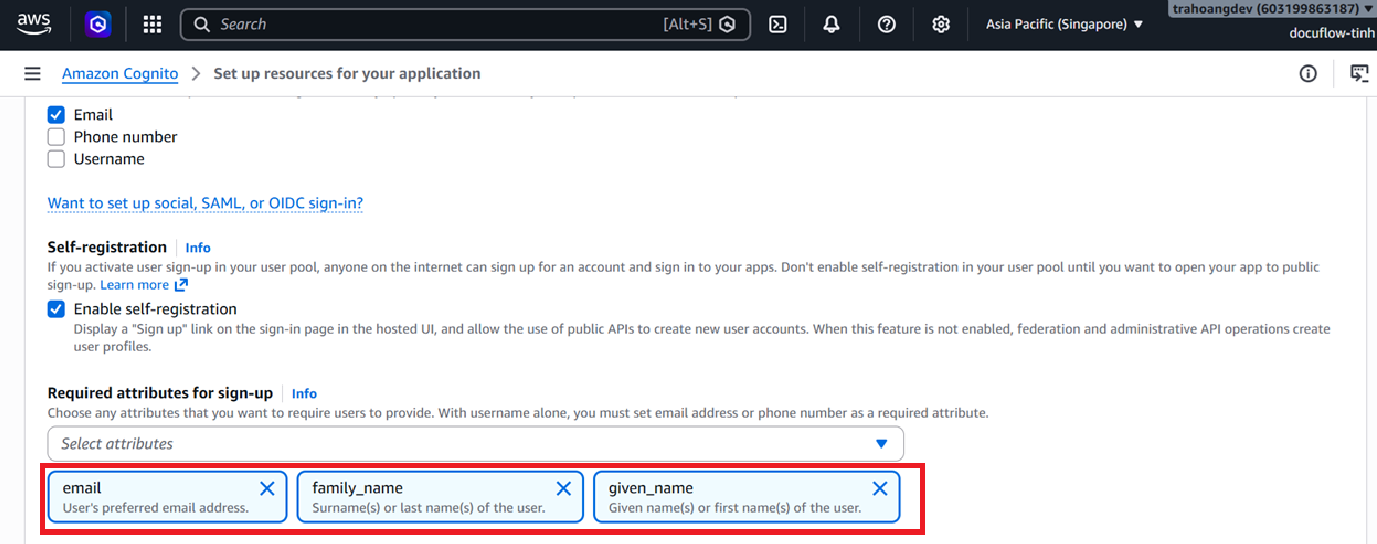
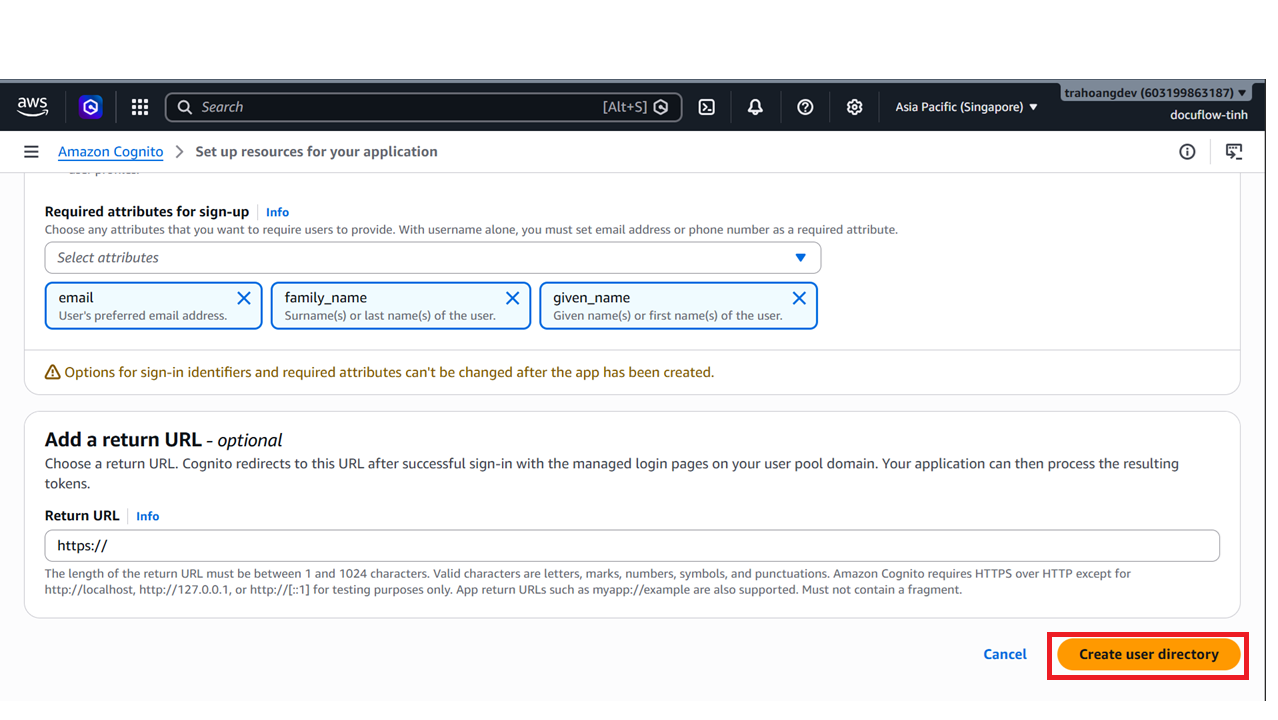
Click Create user directory (or Create user pool).
Save the
UserPoolIDandClientIDfor your.envconfiguration file.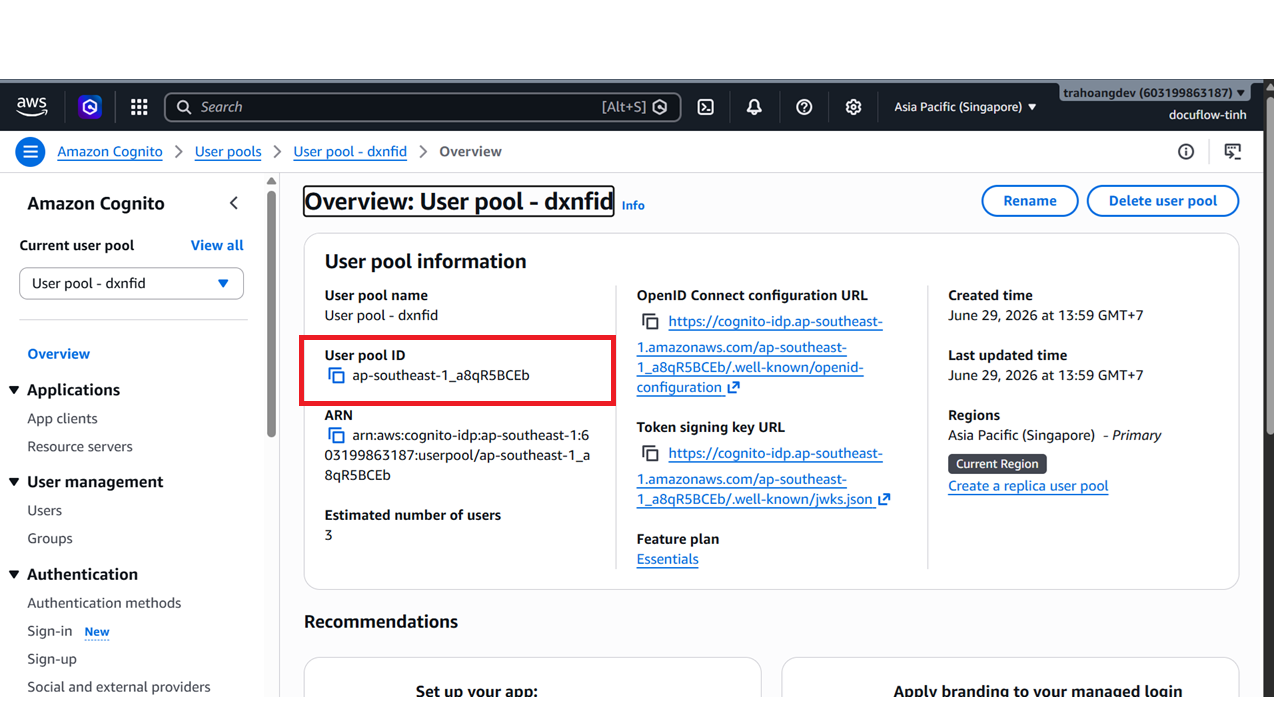
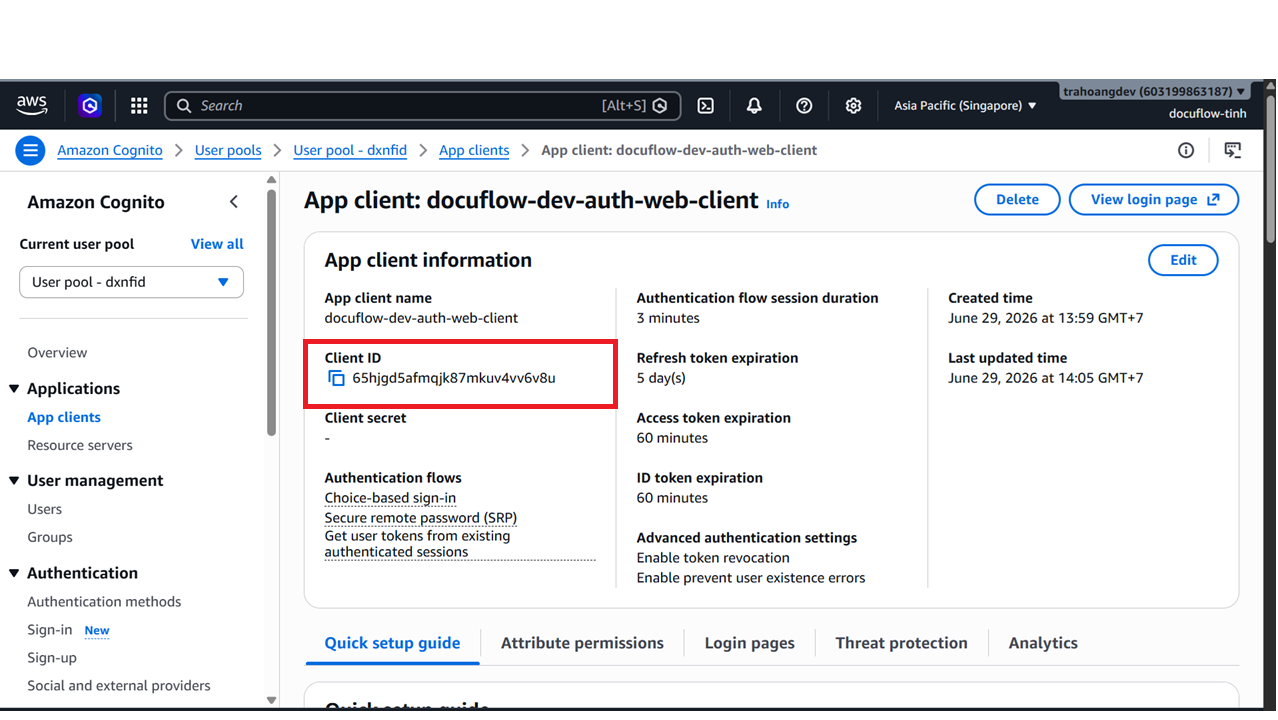
(Optional) You can assign these values to your
.envfile now (we’ll configure it fully in Step 3).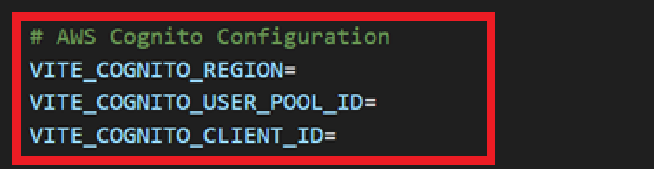
In the newly created User pool, select the Groups tab to create user groups.
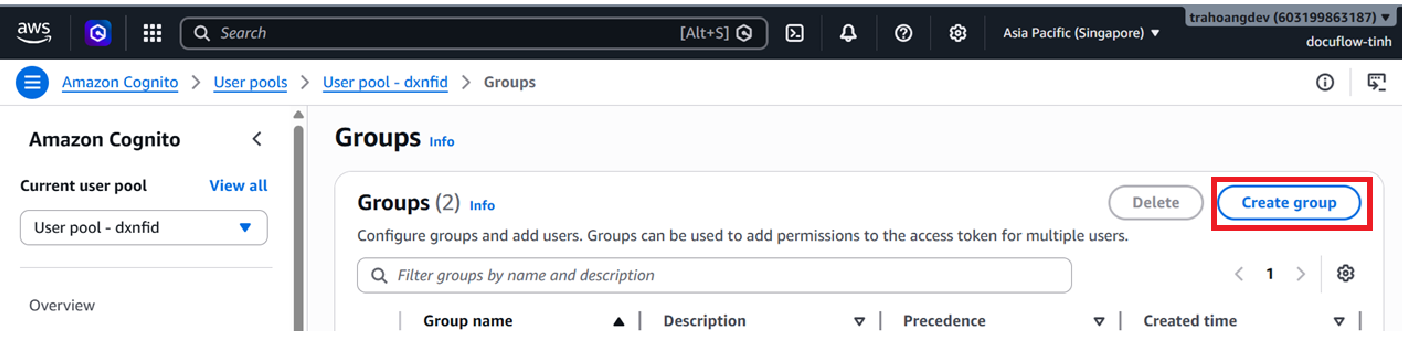
Create a group named
docuflow-dev-admin.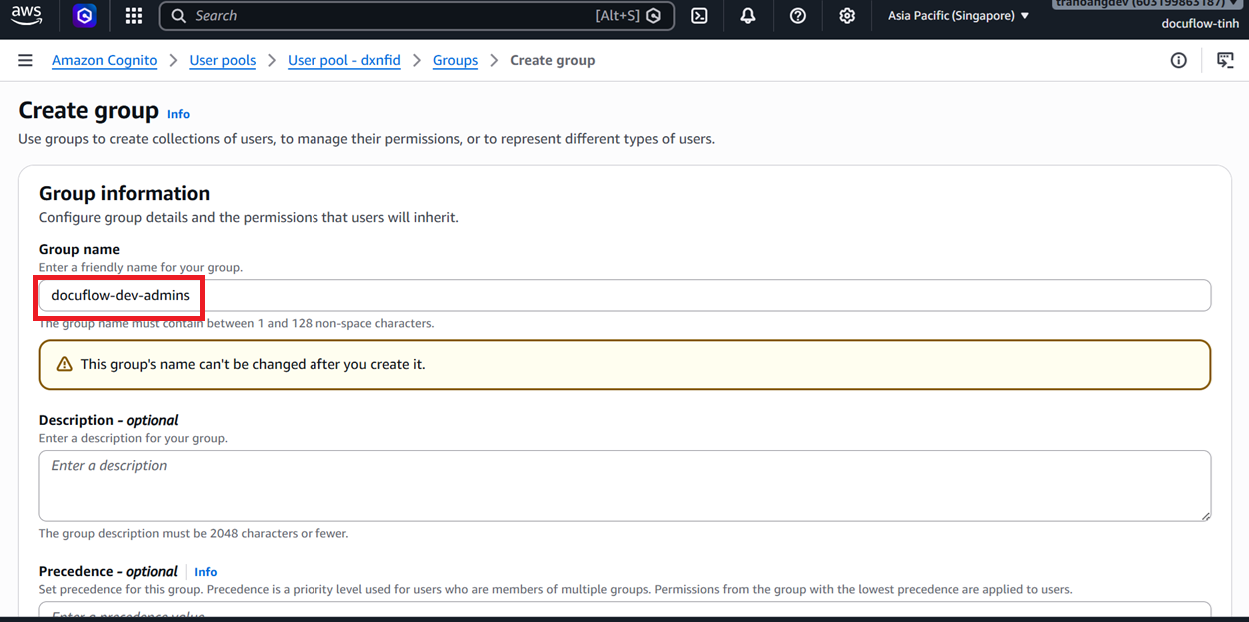
Click Create group.
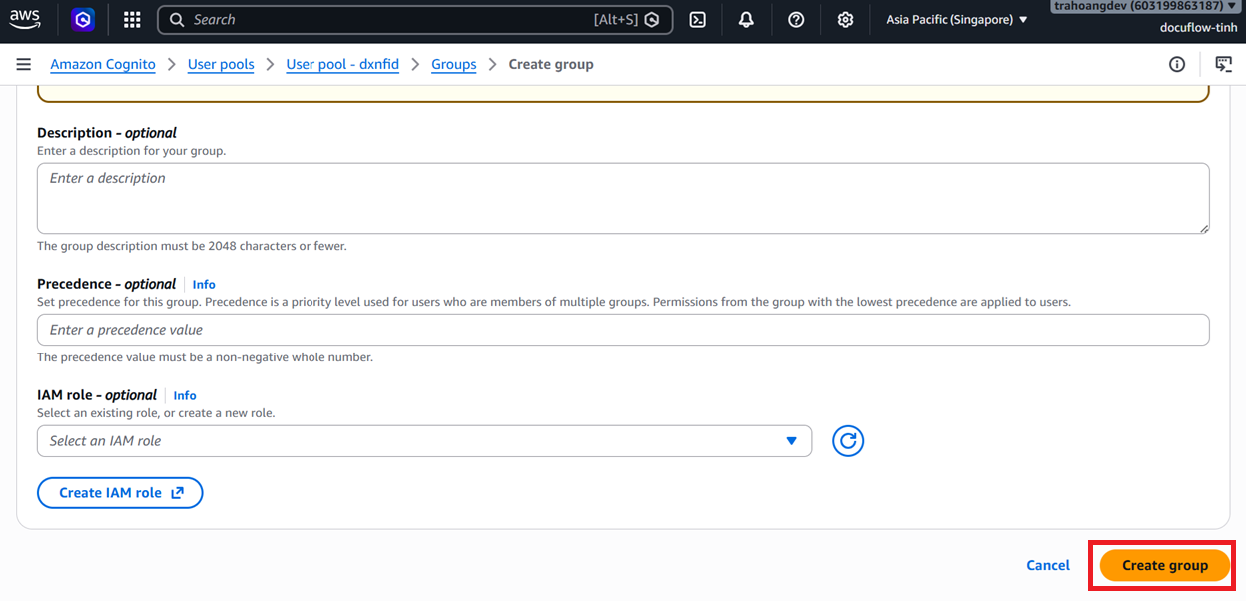
Repeat the process to create another group named
docuflow-dev-usersto achieve the following result: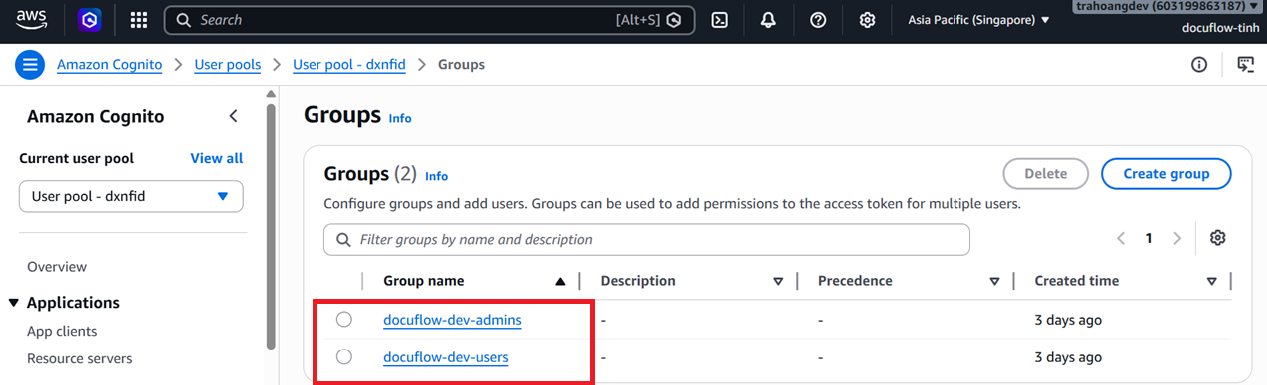
Step 2: Clone & Install Dependencies
- Open your terminal in the workspace directory and clone the project repository:
git clone https://github.com/AeroOps-AWS-FCAJ/aws-serverless-document-processing-workshop.git
cd aws-serverless-document-processing-workshop/apps/web
pnpm install
pnpm run lint
pnpm run typecheck
Step 3: Configure Environment Variables (.env)
- Create a
.envfile in theapps/web/directory based on.env.example:Note: If the API Gateway is not yet available, you can leaveVITE_COGNITO_REGION=ap-southeast-1 VITE_COGNITO_USER_POOL_ID=ap-southeast-1_xxxxxxxxx VITE_COGNITO_CLIENT_ID=xxxxxxxxxxxxxxxxxxxxxxxxxx VITE_API_BASE_URL=https://xxxxxxxxx.execute-api.ap-southeast-1.amazonaws.com/devVITE_API_BASE_URLblank. The frontend will automatically fall back to using Mock data for UI exploration. - Save the file.
Step 4: Run Application & Explore (Local Demo Roles)
- Start the local development server:
pnpm --filter docuflow-ai-web dev - Open your browser and navigate to the provided URL (e.g.,
http://localhost:5173). - If Cognito is not yet fully wired, the frontend provides Mock Authentication stored in LocalStorage for authorization testing:
- Finance User:
finance@docuflow.ai/password(Uploads and views their own invoices, performs reviews) - Administrator:
admin@docuflow.ai/password(Inspects all records, accesses Operations)
- Finance User:
Step 5: Deploy the Presigned URL Lambda Function (docuflow-dev-api-generate-upload-url-lambda)
This Lambda function receives frontend requests, generates S3 Presigned URLs, and initializes metadata inside the DynamoDB documents table.
- Go to Lambda -> click Create function -> Author from scratch.
- Function name:
docuflow-dev-api-generate-upload-url-lambda. - Runtime: Select
Node.js 18.xor higher. - Role: Select Use an existing role -> choose
docuflow-dev-security-upload-url-role. - Click Create function.
- Under Configuration tab -> General configuration: Edit the Timeout to 10 seconds.
- Under Configuration tab -> Environment variables: Add the following environment variables:
DOCUFLOW_DEV_TABLE_NAME=docuflow-dev-documents-tableDOCUFLOW_DEV_RAW_BUCKET=docuflow-dev-raw-<AWS_ACCOUNT_ID>-ap-southeast-1
- In the Code tab, copy and paste the code below into
index.mjsand click Deploy:import { randomUUID } from "node:crypto"; import { DynamoDBClient } from "@aws-sdk/client-dynamodb"; import { DynamoDBDocumentClient, PutCommand } from "@aws-sdk/lib-dynamodb"; import { S3Client, PutObjectCommand } from "@aws-sdk/client-s3"; import { getSignedUrl } from "@aws-sdk/s3-request-presigner"; const docClient = DynamoDBDocumentClient.from(new DynamoDBClient({})); const s3Client = new S3Client({ requestChecksumCalculation: "WHEN_REQUIRED", }); const RAW_BUCKET = process.env.RAW_BUCKET || process.env.DOCUFLOW_DEV_RAW_BUCKET; const TABLE_NAME = process.env.DOCUFLOW_DEV_TABLE_NAME; const EXPIRES_SECONDS = Number( process.env.PRESIGNED_EXPIRES_SECONDS || 300 ); const MAX_FILE_SIZE_BYTES = Number( process.env.MAX_FILE_SIZE_BYTES || 10 * 1024 * 1024 ); const ALLOWED_MIME_TYPES = { "application/pdf": { fileExtension: "pdf", allowedOriginalExtensions: [".pdf"], }, "image/jpeg": { fileExtension: "jpg", allowedOriginalExtensions: [".jpg", ".jpeg"], }, "image/png": { fileExtension: "png", allowedOriginalExtensions: [".png"], }, }; export const handler = async (event) => { const method = getHttpMethod(event); log("INFO", { method, message: "Request received" }); if (method === "OPTIONS") { return successResponse(200, null); } if (method !== "POST") { return errorResponse( 405, "METHOD_NOT_ALLOWED", "Only POST is supported.", "API" ); } const configurationError = validateConfiguration(); if (configurationError) return configurationError; const userId = getUserId(event); if (!userId) { return errorResponse( 401, "UNAUTHORIZED", "Missing authenticated Cognito user.", "AUTH" ); } try { const body = parseBody(event); if (body === null) { return errorResponse( 400, "SCHEMA_VALIDATION_FAILED", "Request body must be valid JSON.", "SCHEMA_VALIDATION" ); } const originalFileName = body.originalFileName; const mimeType = body.mimeType; const fileSizeBytes = Number(body.fileSizeBytes); const pageCount = Number(body.pageCount); const documentType = normalizeDocumentType(body.documentType); if ( !originalFileName || !mimeType || body.fileSizeBytes === undefined || body.pageCount === undefined ) { return errorResponse( 400, "SCHEMA_VALIDATION_FAILED", "originalFileName, mimeType, fileSizeBytes, and pageCount are required.", "SCHEMA_VALIDATION" ); } if (!isValidOriginalFileName(originalFileName)) { return errorResponse( 400, "SCHEMA_VALIDATION_FAILED", "originalFileName is invalid.", "SCHEMA_VALIDATION" ); } if (!Number.isFinite(fileSizeBytes) || fileSizeBytes <= 0) { return errorResponse( 400, "SCHEMA_VALIDATION_FAILED", "fileSizeBytes must be a positive number.", "SCHEMA_VALIDATION" ); } if (fileSizeBytes > MAX_FILE_SIZE_BYTES) { return errorResponse( 413, "FILE_TOO_LARGE", `File size exceeds the maximum allowed size of ${MAX_FILE_SIZE_BYTES} bytes.`, "VALIDATION" ); } if (!Number.isInteger(pageCount) || pageCount <= 0) { return errorResponse( 400, "SCHEMA_VALIDATION_FAILED", "pageCount must be a positive integer.", "SCHEMA_VALIDATION" ); } if (pageCount > 1) { return errorResponse( 422, "MULTI_PAGE_REQUIRES_ASYNC_TEXTRACT", "Multi-page documents are not supported until the asynchronous Textract workflow is enabled.", "TEXTRACT_VALIDATION" ); } if (body.documentType !== undefined && documentType === "UNKNOWN") { return errorResponse( 400, "INVALID_DOCUMENT_TYPE", "documentType must be INVOICE or RECEIPT when provided.", "SCHEMA_VALIDATION" ); } const mimeTypeConfig = ALLOWED_MIME_TYPES[mimeType]; if (!mimeTypeConfig || !isExtensionMatched(originalFileName, mimeTypeConfig)) { return errorResponse( 400, "INVALID_FILE_TYPE", "Only matching PDF, JPG, JPEG, and PNG file types are supported.", "VALIDATION" ); } const documentId = `doc-${randomUUID()}`; const now = new Date().toISOString(); const rawS3Key = `raw/${userId}/${documentId}/${toRawObjectFileName(originalFileName)}`; const uploadMetadata = { "original-file-name": encodeURIComponent(originalFileName), "page-count": String(pageCount), "document-type": documentType, "declared-file-size": String(fileSizeBytes), }; const putCommand = new PutObjectCommand({ Bucket: RAW_BUCKET, Key: rawS3Key, ContentType: mimeType, Metadata: uploadMetadata, }); const signedUploadHeaders = { "content-type": mimeType, ...Object.fromEntries( Object.entries(uploadMetadata).map(([key, value]) => [ `x-amz-meta-${key}`, value, ]) ), }; const uploadUrl = await getSignedUrl(s3Client, putCommand, { expiresIn: EXPIRES_SECONDS, signableHeaders: new Set(Object.keys(signedUploadHeaders)), unhoistableHeaders: new Set( Object.keys(signedUploadHeaders).filter((key) => key.startsWith("x-amz-meta-") ) ), }); await createUploadMetadata({ documentId, documentType, fileSizeBytes, mimeType, now, originalFileName, pageCount, rawS3Key, userId, }); log("INFO", { documentId, userId, mimeType, fileSizeBytes, pageCount, documentType, rawS3Bucket: RAW_BUCKET, rawS3Key, status: "UPLOAD_URL_CREATED", message: "Presigned URL generated", }); return successResponse(200, { documentId, uploadUrl, rawS3Key, originalFileName, expiresInSeconds: EXPIRES_SECONDS, uploadHeaders: signedUploadHeaders, }); } catch (error) { log("ERROR", { errorName: error?.name, errorMessage: error?.message, message: "Failed to generate presigned URL", }); return errorResponse( 500, "UNKNOWN_ERROR", "Could not generate upload URL.", "UPLOAD" ); } }; function apiResponse(statusCode, body) { return { statusCode, headers: { "Content-Type": "application/json", "Access-Control-Allow-Origin": "*", "Access-Control-Allow-Headers": "Content-Type,Authorization,X-Amz-Date,X-Api-Key,X-Amz-Security-Token", "Access-Control-Allow-Methods": "OPTIONS,POST", }, body: JSON.stringify(body), }; } function successResponse(statusCode, data) { return apiResponse(statusCode, { success: true, data, error: null }); } function errorResponse( statusCode, errorCode, errorMessage, errorStage = "VALIDATION" ) { return apiResponse(statusCode, { success: false, data: null, error: { errorCode, errorMessage, errorStage }, }); } function getHttpMethod(event) { return event?.requestContext?.http?.method || event?.httpMethod || ""; } function parseBody(event) { if (!event?.body) return {}; let bodyText = event.body; if (event.isBase64Encoded) { bodyText = Buffer.from(event.body, "base64").toString("utf8"); } if (typeof bodyText === "object" && bodyText !== null) return bodyText; try { const parsed = JSON.parse(bodyText); return parsed && typeof parsed === "object" && !Array.isArray(parsed) ? parsed : null; } catch { return null; } } function getUserId(event) { return ( event?.requestContext?.authorizer?.jwt?.claims?.sub || event?.requestContext?.authorizer?.claims?.sub || null ); } function normalizeDocumentType(value) { const type = String(value || "").trim().toUpperCase(); return type === "INVOICE" || type === "RECEIPT" ? type : "UNKNOWN"; } function validateConfiguration() { if (!RAW_BUCKET) { return errorResponse( 500, "MISSING_ENVIRONMENT_VARIABLE", "RAW_BUCKET or DOCUFLOW_DEV_RAW_BUCKET environment variable is missing.", "CONFIGURATION" ); } if (!TABLE_NAME) { return errorResponse( 500, "MISSING_ENVIRONMENT_VARIABLE", "DOCUFLOW_DEV_TABLE_NAME environment variable is missing.", "CONFIGURATION" ); } if ( !Number.isInteger(EXPIRES_SECONDS) || EXPIRES_SECONDS < 1 || EXPIRES_SECONDS > 3600 ) { return errorResponse( 500, "INVALID_CONFIGURATION", "PRESIGNED_EXPIRES_SECONDS must be an integer between 1 and 3600.", "CONFIGURATION" ); } if (!Number.isFinite(MAX_FILE_SIZE_BYTES) || MAX_FILE_SIZE_BYTES <= 0) { return errorResponse( 500, "INVALID_CONFIGURATION", "MAX_FILE_SIZE_BYTES must be a positive number.", "CONFIGURATION" ); } return null; } function isValidOriginalFileName(originalFileName) { return ( typeof originalFileName === "string" && Boolean(originalFileName.trim()) && !originalFileName.includes("/") && !originalFileName.includes("\\") && originalFileName.length <= 255 ); } function isExtensionMatched(originalFileName, mimeTypeConfig) { const lowerFileName = originalFileName.toLowerCase(); return mimeTypeConfig.allowedOriginalExtensions.some((extension) => lowerFileName.endsWith(extension) ); } function toRawObjectFileName(originalFileName) { return originalFileName .trim() .replace(/[\u0000-\u001f\u007f]/g, "_") .replace(/[?#]/g, "_"); } async function createUploadMetadata({ documentId, documentType, fileSizeBytes, mimeType, now, originalFileName, pageCount, rawS3Key, userId, }) { await docClient.send( new PutCommand({ TableName: TABLE_NAME, Item: { PK: `USER#${userId}`, SK: `DOC#${documentId}`, GSI1PK: "STATUS#UPLOADED", GSI1SK: now, schemaVersion: "1.0.0", documentId, userId, documentType, status: "UPLOADED", originalFileName, fileExtension: getFileExtension(originalFileName), pageCount, mimeType, contentType: mimeType, fileSizeBytes, rawS3Key, createdAt: now, updatedAt: now, }, ConditionExpression: "attribute_not_exists(PK) AND attribute_not_exists(SK)", }) ); } function getFileExtension(fileName) { const match = String(fileName || "").toLowerCase().match(/\.([a-z0-9]+)$/); return match ? match[1] : ""; } function log(level, data) { const writer = level === "ERROR" ? console.error : console.log; writer( JSON.stringify({ level, service: "docuflow-dev-api-generate-upload-url-lambda", ...data, }) ); }
Step 5: Run the Dev Server & Test Uploads
- Start the React/Vite local dev server:
npm run dev - Open
http://localhost:5173on your browser. - Sign up a test user account -> confirm the account using the verification code sent to your email.
- Log in -> upload a test PDF invoice or receipt.
- In the S3 console, check your S3 Raw Bucket to verify the file was uploaded directly to
raw/user-xxxx/doc-xxxx/original.pdf.
3. Expected Result
- React Frontend runs successfully in development mode.
- Cognito JWT Authentication works perfectly.
- Frontend uploads PDF documents directly to the S3 Raw Bucket using Presigned URLs.
4. Evidence
Before continuing, verify that:
- The React application runs locally without console errors.
- Cognito registration and sign-in succeed.
- The upload flow reports success.
- The uploaded object appears at the expected key in the S3 Raw bucket.